> ## Documentation Index
> Fetch the complete documentation index at: https://docs.readdy.ai/llms.txt
> Use this file to discover all available pages before exploring further.
# AI SEO Analysis
> AI-powered website health checker that analyzes SEO, performance, security, accessibility, and user experience issues
AI SEO Analysis is an AI-powered website health checker that helps you identify and resolve issues across five critical categories: SEO, Performance, Security, Content, and Health.
With AI SEO Analysis, you can:
* **Save Time**: Automatically detect common website issues in seconds
* **AI-Driven Insights**: Get personalized solutions and actionable recommendations
* **Build Trust**: Ensure your website is healthy, secure, and user-friendly
AI SEO Analysis is available to paid users only. [Upgrade to the Pro
plan](https://readdy.ai/user/subscription) to access this feature.
## Why Use AI SEO Analysis
Publishing a website is just the beginning. To attract and retain visitors, your site needs to be fast, secure, accessible, and easy to find on search engines. AI SEO Analysis helps you:
* **Improve Search Rankings**: Identify and fix SEO issues that may be hurting your visibility
* **Enhance User Experience**: Discover performance bottlenecks and design problems
* **Protect Visitor Data**: Find security vulnerabilities before they become problems
* **Reach More Users**: Ensure your site is accessible to everyone, including those with disabilities
## Getting Started
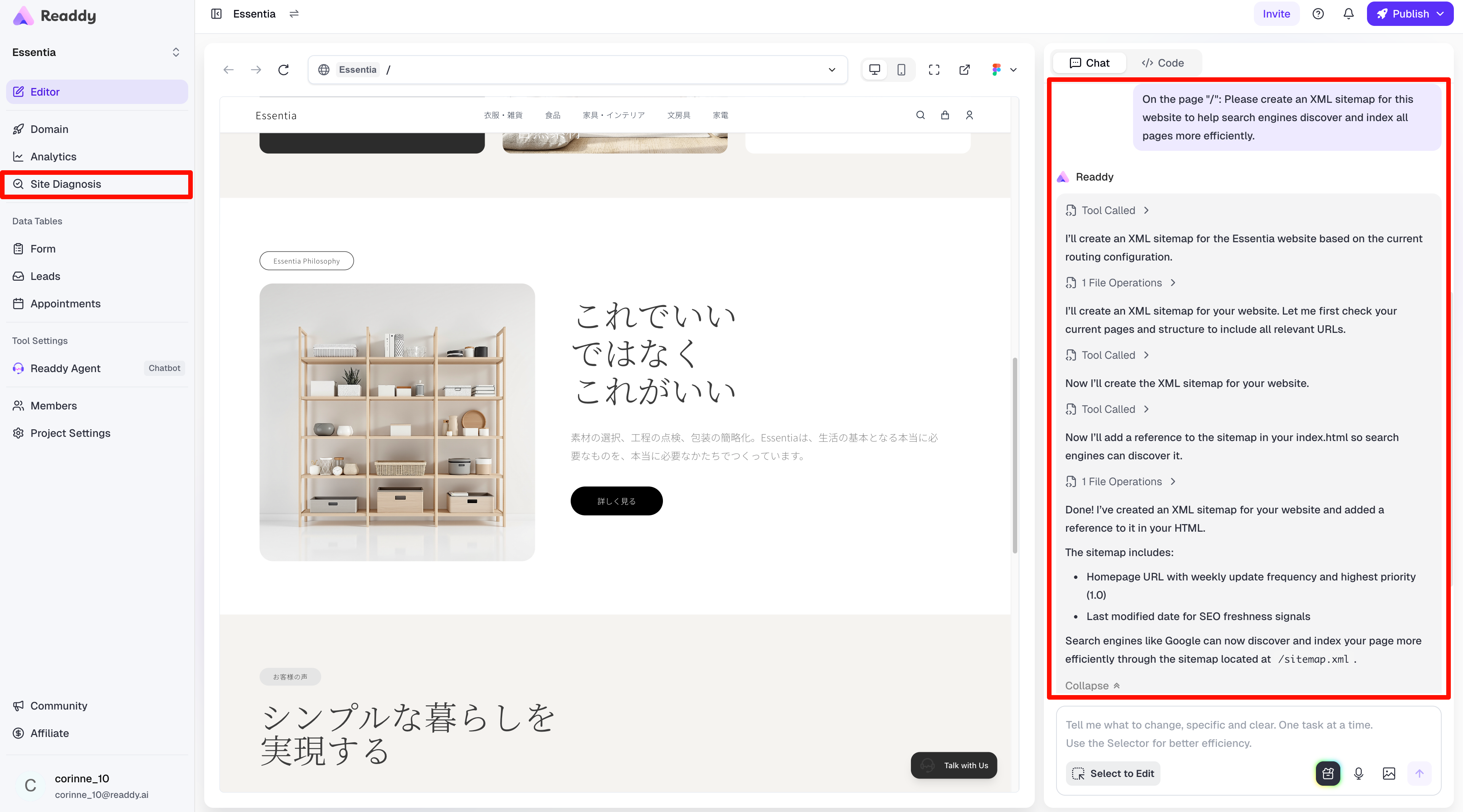
From your project dashboard, click on **AI SEO Analysis** in the left navigation panel, then click **Start Diagnosis** to begin.
Make sure your website is published before running a diagnosis.
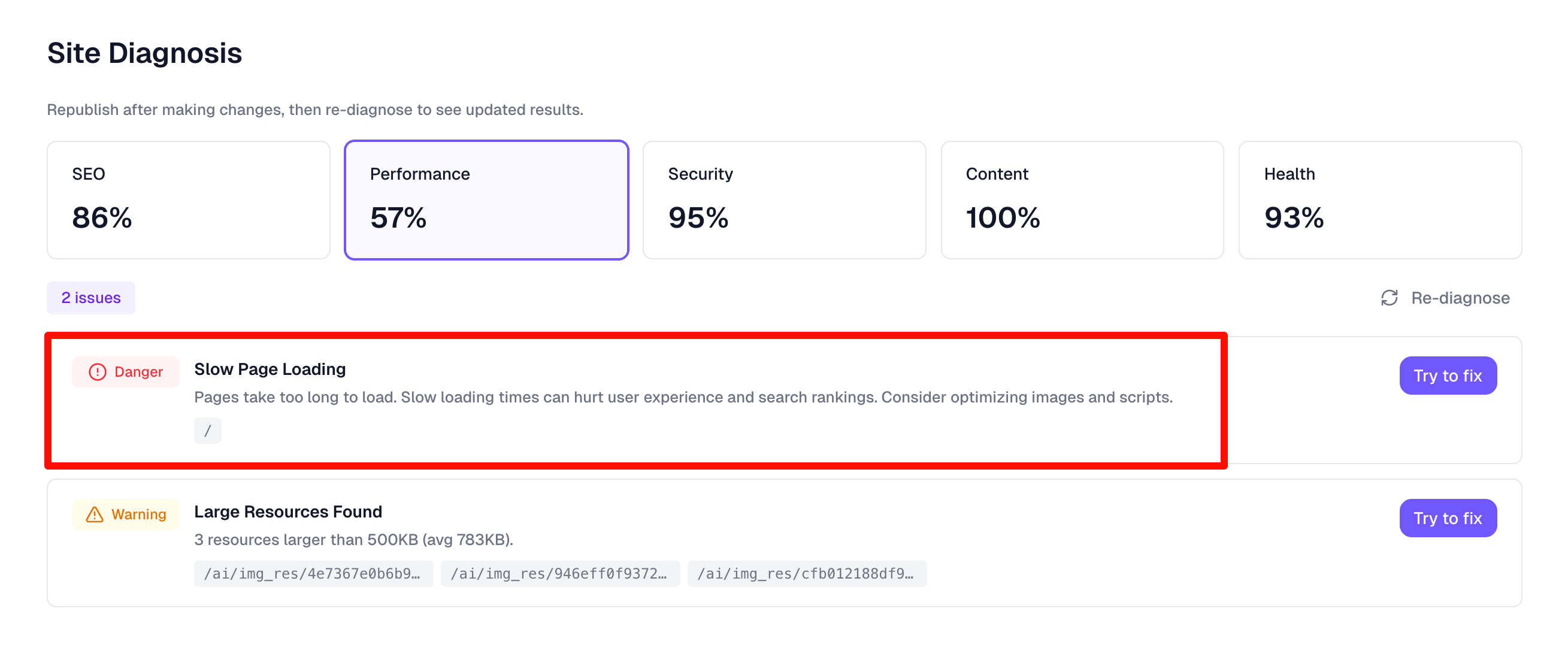
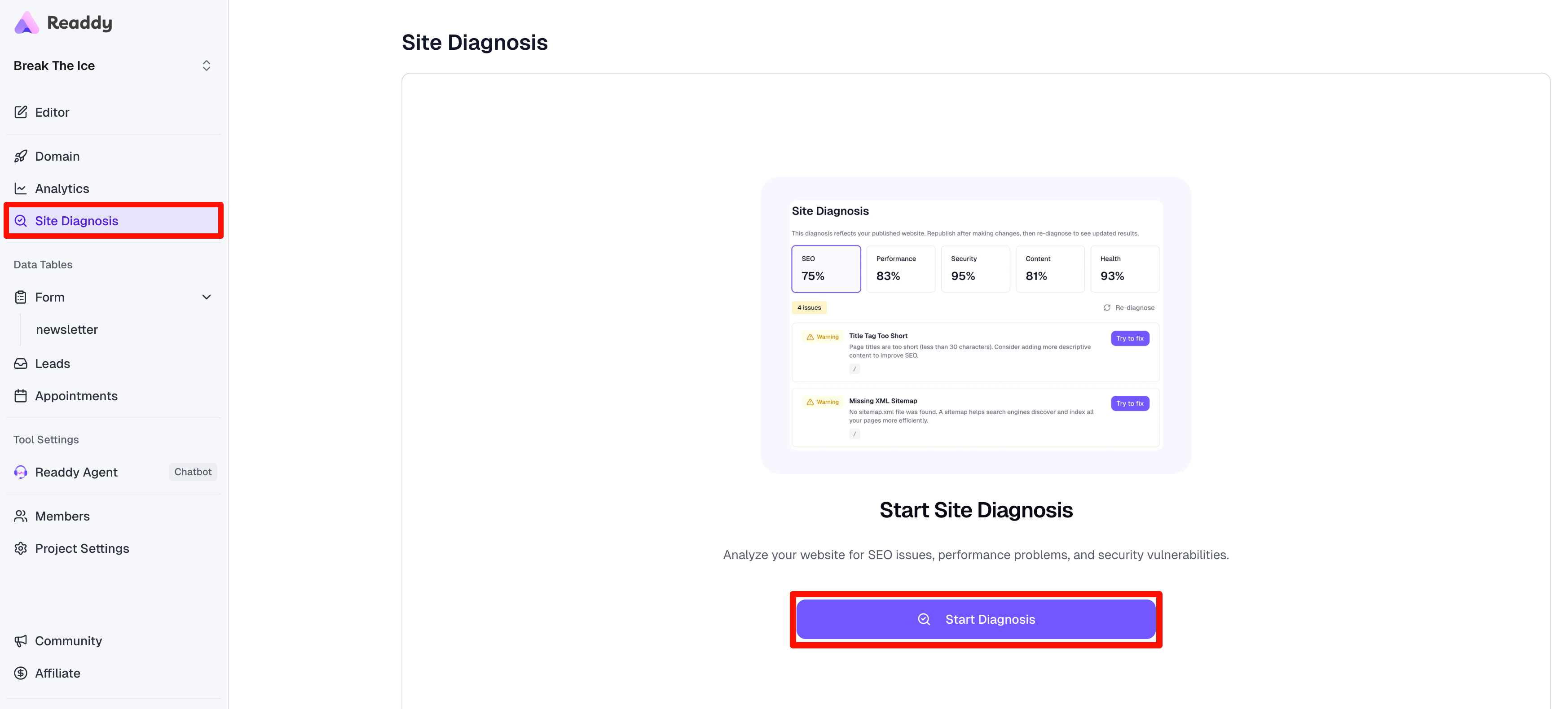 Readdy will analyze your website for 10-30 seconds, checking for issues across all five categories: **SEO**, **Performance**, **Security**, **Content**, and **Health**.
 Once complete, you'll see a comprehensive health score and detailed breakdown of any issues found. You can switch between the five dimension tabs to view specific issues in each category.
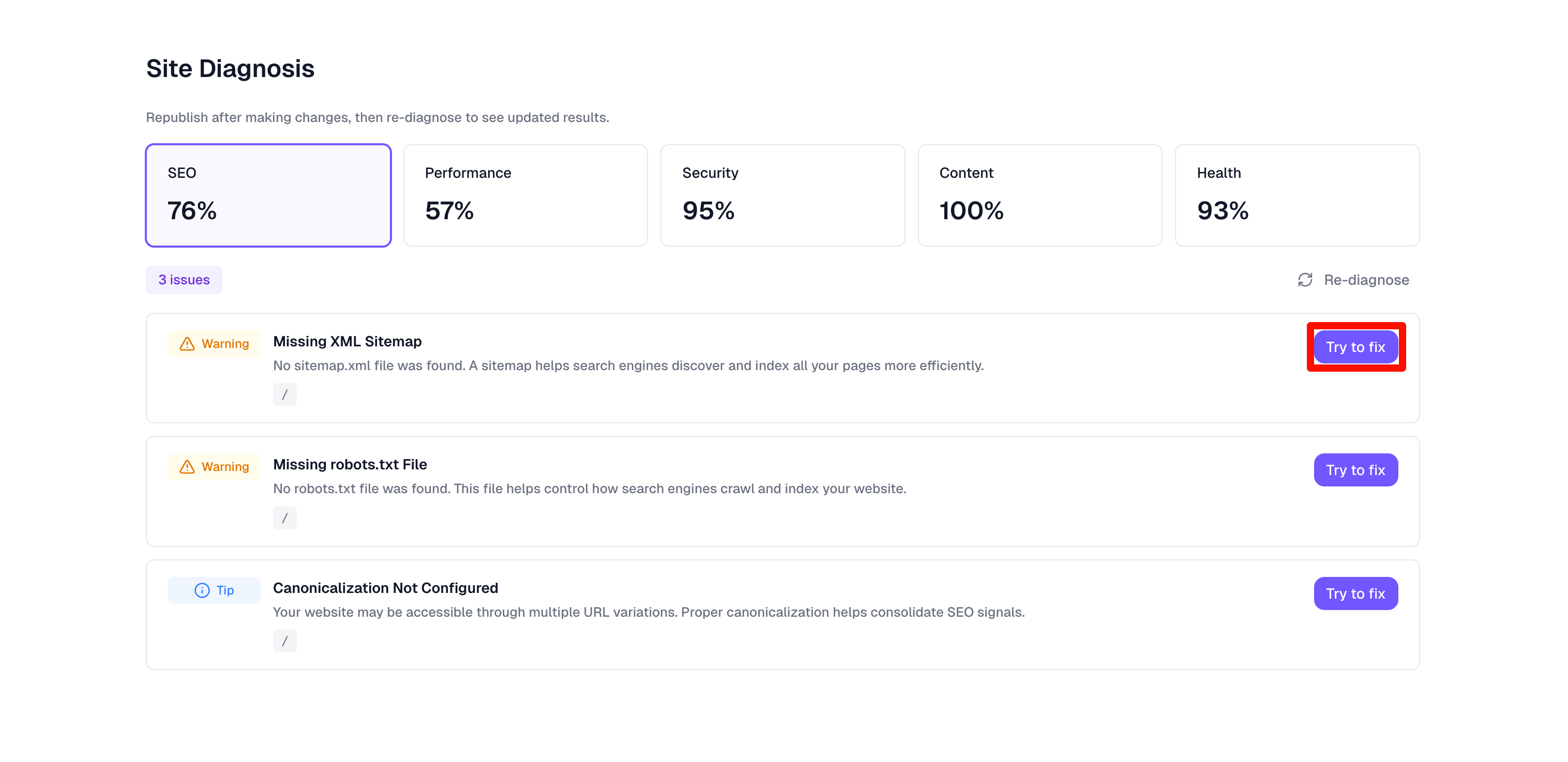 Click the **Try to Fix** button next to any issue you want to resolve. The system will automatically navigate to the editor page with the fix request ready—just click send to proceed.
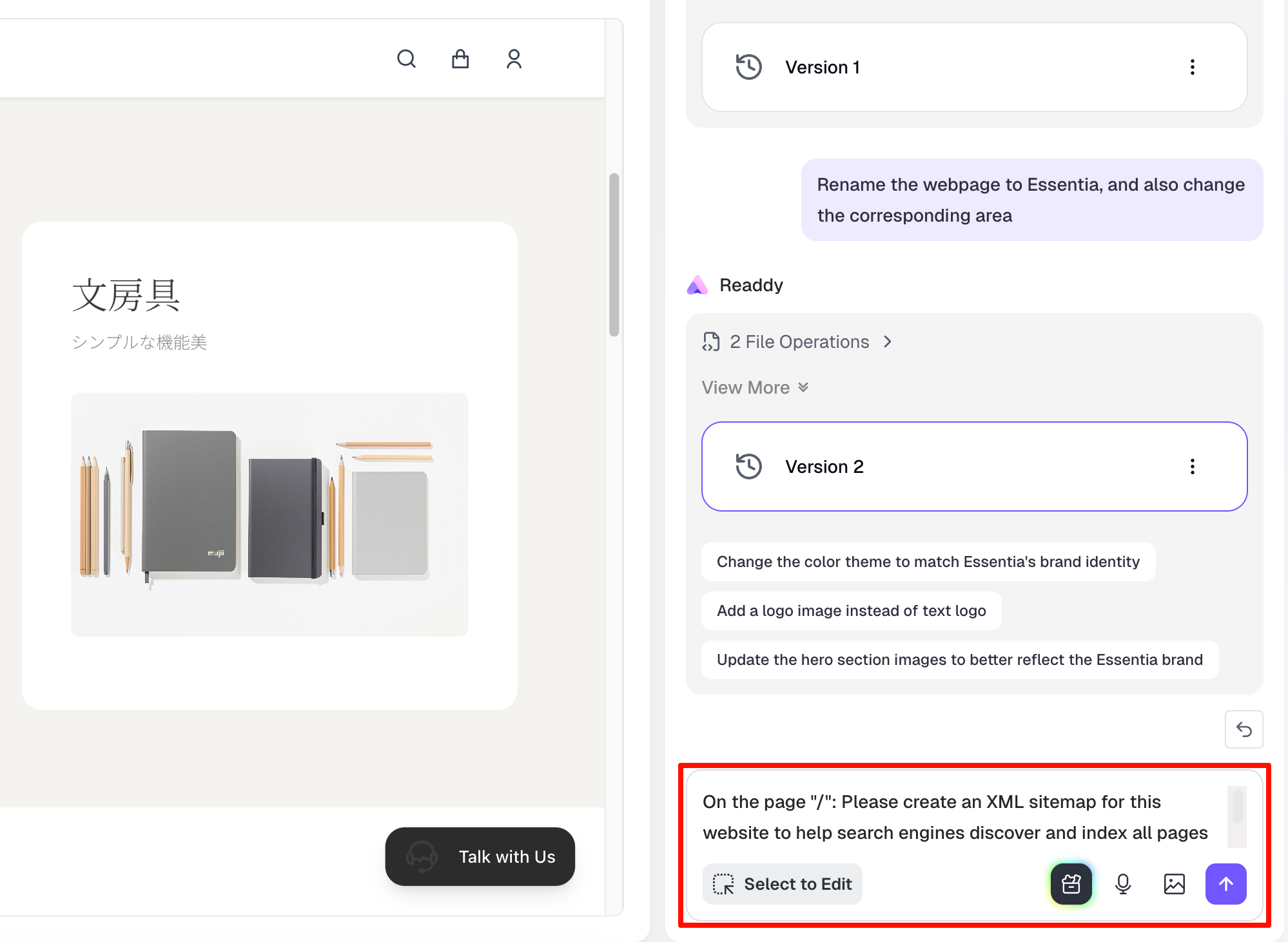 Once AI optimization is complete, click **AI SEO Analysis** in the left navigation panel to return to the diagnosis results page and continue fixing the next issue.
 ## Understanding Diagnosis Results
### Health Score
Your overall health score provides a quick snapshot of your website's condition. A higher score indicates fewer critical issues.
### Issue Categories
Issues are organized into five categories, each with severity indicators:
Checks for:
* Missing or duplicate meta tags
* Title tag issues
* Structured data problems
* Open Graph and Twitter Card metadata
Analyzes: - **Core Web Vitals**: - **LCP (Largest Contentful Paint)**:
Measures loading performance - **FID (First Input Delay)**: Measures
interactivity - **CLS (Cumulative Layout Shift)**: Measures visual stability -
Page load times - Resource optimization opportunities
Identifies: - SSL/HTTPS configuration issues - Mixed content warnings (HTTP
resources on HTTPS pages) - Security headers
Tests for: - ARIA labels and roles - Color contrast ratios - Semantic HTML
structure - Keyboard navigation support
Examines:
* Mobile responsiveness
* Navigation structure
* Broken links and 404 errors
* Layout and design consistency
## Collaboration Mode
AI SEO Analysis supports team collaboration, allowing multiple team members to review and fix issues together.
### Team Roles & Permissions
In collaborative projects where the owner has upgraded to the Pro plan, both **Owner** and **Editor** roles can perform AI SEO Analysis on the website.
**Viewers** do not have access to the AI SEO Analysis feature.
## Best Practices
* **Run Diagnoses Regularly**: Re-diagnose your published website after making updates
* **Prioritize Critical Issues**: Address critical and high-severity issues first
## Understanding Diagnosis Results
### Health Score
Your overall health score provides a quick snapshot of your website's condition. A higher score indicates fewer critical issues.
### Issue Categories
Issues are organized into five categories, each with severity indicators:
Checks for:
* Missing or duplicate meta tags
* Title tag issues
* Structured data problems
* Open Graph and Twitter Card metadata
Analyzes: - **Core Web Vitals**: - **LCP (Largest Contentful Paint)**:
Measures loading performance - **FID (First Input Delay)**: Measures
interactivity - **CLS (Cumulative Layout Shift)**: Measures visual stability -
Page load times - Resource optimization opportunities
Identifies: - SSL/HTTPS configuration issues - Mixed content warnings (HTTP
resources on HTTPS pages) - Security headers
Tests for: - ARIA labels and roles - Color contrast ratios - Semantic HTML
structure - Keyboard navigation support
Examines:
* Mobile responsiveness
* Navigation structure
* Broken links and 404 errors
* Layout and design consistency
## Collaboration Mode
AI SEO Analysis supports team collaboration, allowing multiple team members to review and fix issues together.
### Team Roles & Permissions
In collaborative projects where the owner has upgraded to the Pro plan, both **Owner** and **Editor** roles can perform AI SEO Analysis on the website.
**Viewers** do not have access to the AI SEO Analysis feature.
## Best Practices
* **Run Diagnoses Regularly**: Re-diagnose your published website after making updates
* **Prioritize Critical Issues**: Address critical and high-severity issues first
 * **Consider User Impact**: Focus on issues that directly affect your visitors' experience
## Notes
* Diagnosis scans typically take 10-30 seconds depending on website size and
complexity - Results are based on the state of your website at the time of
scanning - Some performance metrics may vary based on visitor location and
network conditions
***
## Need More Help?
If you need assistance with AI SEO Analysis, our support team is here to help:
* Email: [hi@readdy.ai](mailto:hi@readdy.ai)
* Feedback: [https://readdy.ai/feedback](https://readdy.ai/feedback)
* **Consider User Impact**: Focus on issues that directly affect your visitors' experience
## Notes
* Diagnosis scans typically take 10-30 seconds depending on website size and
complexity - Results are based on the state of your website at the time of
scanning - Some performance metrics may vary based on visitor location and
network conditions
***
## Need More Help?
If you need assistance with AI SEO Analysis, our support team is here to help:
* Email: [hi@readdy.ai](mailto:hi@readdy.ai)
* Feedback: [https://readdy.ai/feedback](https://readdy.ai/feedback)