> ## Documentation Index
> Fetch the complete documentation index at: https://docs.readdy.ai/llms.txt
> Use this file to discover all available pages before exploring further.
# AEO/GEO Optimization
> Enable llms.txt and per-page schema markup after your site is already live on a custom domain.
AEO/GEO Optimization helps AI crawlers and Google better understand your website after it is already live on a custom domain.
When you enable this option during a later publish, Readdy creates a site-wide `llms.txt` file and adds schema structured data to each page.
***
## Feature Highlights
AEO/GEO Optimization is an optional publish setting for React projects that have already been published successfully.
Once enabled, it helps:
* Create an `llms.txt` file for your website
* Add schema structured data to every page
* Make your content easier for AI crawlers and Google to understand
***
## Before You Start
This option is available only after your website has already been published once and connected to a custom domain.
If you have not connected a custom domain yet, follow [Publish - for React Project](/features/publish-react-v2) first.
This guide applies to React projects using Readdy's custom-domain publish flow.
***
## How to Enable It
Go to the project that has already been published successfully on your custom domain.
Click **Publish** in the top-right corner. In the publish dialog, enable **Optimization AEO/GEO**.
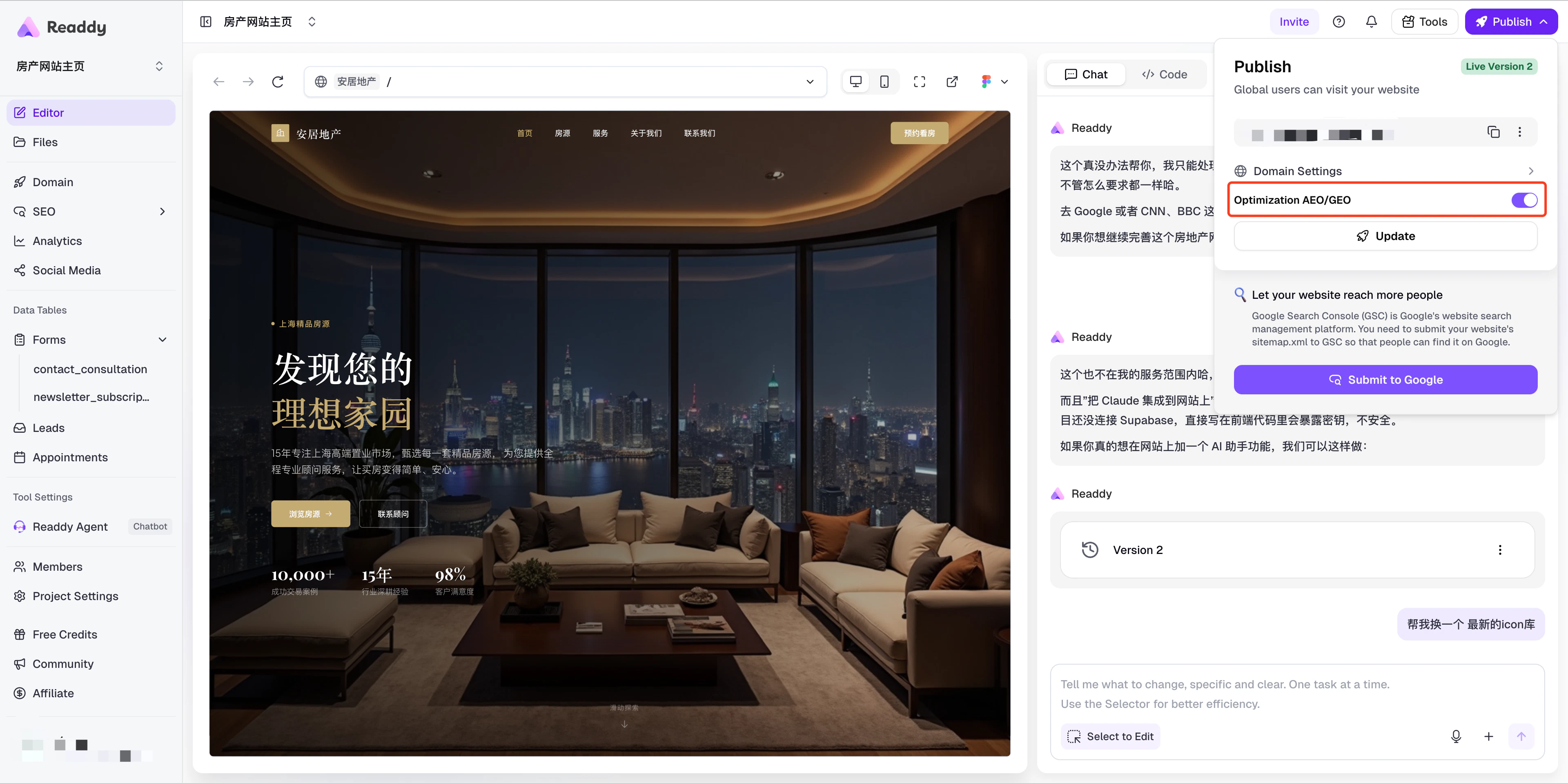 Click **Update** to publish again. Readdy will then start generating `llms.txt` and page-level schema structured data for your site.
After you publish, this optimization may take some time to become available.
This usually takes about 3 to 30 minutes, depending on how many pages your
website has.
***
## How to Verify
Open `https://yourdomain/llms.txt` in your browser, replacing `yourdomain` with your actual custom domain.
If the page is available, your `llms.txt` file has been created and the AEO/GEO optimization is in effect.
***
## FAQs
Yes. Open the publish dialog again and turn off the **Optimization AEO/GEO** toggle, then click **Update** to republish. The `llms.txt` file and schema markup will be removed after the next publish.
No. This feature only adds an `llms.txt` file and schema structured data. It does not modify your existing pages or content.
***
## Need Help?
If this guide doesn't resolve your issue:
* Email: [hi@readdy.ai](mailto:hi@readdy.ai)
* Feedback: [https://readdy.ai/feedback](https://readdy.ai/feedback)
Click **Update** to publish again. Readdy will then start generating `llms.txt` and page-level schema structured data for your site.
After you publish, this optimization may take some time to become available.
This usually takes about 3 to 30 minutes, depending on how many pages your
website has.
***
## How to Verify
Open `https://yourdomain/llms.txt` in your browser, replacing `yourdomain` with your actual custom domain.
If the page is available, your `llms.txt` file has been created and the AEO/GEO optimization is in effect.
***
## FAQs
Yes. Open the publish dialog again and turn off the **Optimization AEO/GEO** toggle, then click **Update** to republish. The `llms.txt` file and schema markup will be removed after the next publish.
No. This feature only adds an `llms.txt` file and schema structured data. It does not modify your existing pages or content.
***
## Need Help?
If this guide doesn't resolve your issue:
* Email: [hi@readdy.ai](mailto:hi@readdy.ai)
* Feedback: [https://readdy.ai/feedback](https://readdy.ai/feedback)